Plex's remote streaming changes, explained in plain words
Since late September 2026, playing your own movies from a Plex server while you're "remote" needs a Plex Pass or a Remote Watch Pass, and that now includes third party apps like Infuse and Plezy. If the server owner has a Plex Pass, everyone they share with is covered. If not, each remote viewer needs their own pass. Watching at home on the same network is still free, but some home setups (guest Wi-Fi, a VPN, separate subnets) can make Plex think you're remote.
I run a Plex server for my family, and in late September my group chat lit up. Somebody's Apple TV wanted a Plex Pass. Somebody else swore they were sitting in my living room when it happened. Both of those things can be true, which is why I wanted to write this down in normal words.
Quick disclosure before we start: I make Nostalgex, a free channel guide app that plays your own Plex, Jellyfin or Emby library. It's plug and play: open it on Apple TV, scan the code on screen with your phone, and your library is already airing as channels. It's also a third party Plex app, so this change touches me as much as anyone. I'll tell you exactly where it fits at the end, and I won't pretend it gets around anything.
What actually changed?
Two things, about a year and a half apart.
April 29, 2025. Plex started requiring a Plex Pass or a Remote Watch Pass to stream personal video when you aren't on the same local network as the server. At first that only applied to Plex's own redesigned apps, and Plex's support page said more apps would follow until "eventually all apps and platforms will be affected."
Late September 2026. Plex told Firecore, the team behind Infuse, that the rule was coming to third party apps. Firecore shared the note on Reddit around September 21. In short: starting later that week, every Plex user would need a Remote Watch Pass or a Plex Pass to play from a remote server, and Plex named third party apps like Infuse in the same breath. (XDA Developers has Plex's full wording.) XDA later added that remote streaming had stopped working in Plezy, another third party Plex app, too.
So if you were using Infuse or Plezy to watch away from home for free, that door closed in the last week of September.
What does "remote" mean to Plex?
This is the part that confuses people, so let me quote Plex directly. Remote means "any time that the player app cannot make a connection to the Plex Media Server on the same subnet of the same local network." Generally, that's the same Wi-Fi or wired network as the server.
The catch is the word detect. If Plex can't tell that your TV and your server are on the same network, it treats the connection as remote, even if they're in the same room. Plex's own list of things that can cause that:
- An advanced network setup, like more than one subnet or devices that can't see each other
- A router or network that blocks "DNS rebinding"
- Privacy settings in a browser or device that block local connections
- A server or app running in a container or virtual machine without host networking
- VPNs
A guest Wi-Fi network is a common one in real houses. It's usually set up so devices on it can't see the rest of your network, which is exactly the "devices that can't see each other" case. So when grandma joins the guest Wi-Fi at your place and gets a Plex Pass prompt, Plex isn't lying to her. It just can't see that she's home.
I share my server with family. Who needs to pay?
Here's how Plex lays it out, in my words:
- The server owner has a Plex Pass. Everyone you share with can stream remotely. They don't need their own pass.
- The server owner doesn't have a Plex Pass. Each person who watches from outside your network needs their own Plex Pass or Remote Watch Pass.
- Everyone watches at home, on the same network. Nothing to buy. This change doesn't touch you.
- Music in Plexamp and photos in Plex Photos aren't covered by the rule.
So the real question for families is where people watch. Your sister across town is remote. Your kid at college is remote. Your parents on your guest Wi-Fi might look remote. Your partner on the couch, on the main Wi-Fi, is home.
Prices change and they vary by country, so I'm not going to quote them here. Check Plex's own page for what applies to you.
My TV is at home. Why am I seeing the prompt?
Then Plex probably can't detect the local connection. A few things worth checking, roughly in order:
- Are you on the same network as the server? Not the guest network, not a separate IoT network. Move the TV to the main Wi-Fi or plug it in and try again.
- Is a VPN running? On the TV, the phone or the server. Turn it off and test.
- Is your Plex server in a Docker container? Plex's support page calls out containers without host networking. If you use bridge networking, Plex can see your clients as being on a different network.
- Do you have more than one subnet at home? Plex staff on the forums point people to the server's Network settings, where the LAN Networks field lists the address ranges Plex should treat as local. Enter each range, separated by commas with no spaces (example in this forum thread).
If you've tried all of that and it still says remote, Plex suggests opening a topic on their forums with details about your setup. They're the only ones who can see what their servers think is going on.
Is there a way to watch away from home without a pass?
The workaround people mention most is getting back onto your home network first, with a full VPN or Tailscale, and then watching as if you were home. Firecore pointed Infuse users there, and XDA covered it too.
One honest caution: Plex lists VPNs as something that can cause a remote detection, so how this behaves depends on how your network is set up. Test it before you promise it to your family.
The other path people talk about is moving the server to Jellyfin or Emby. That's a bigger decision than a blog post, and I'm writing a separate post about what happens to your channel guide if you switch.
Where does Nostalgex fit?
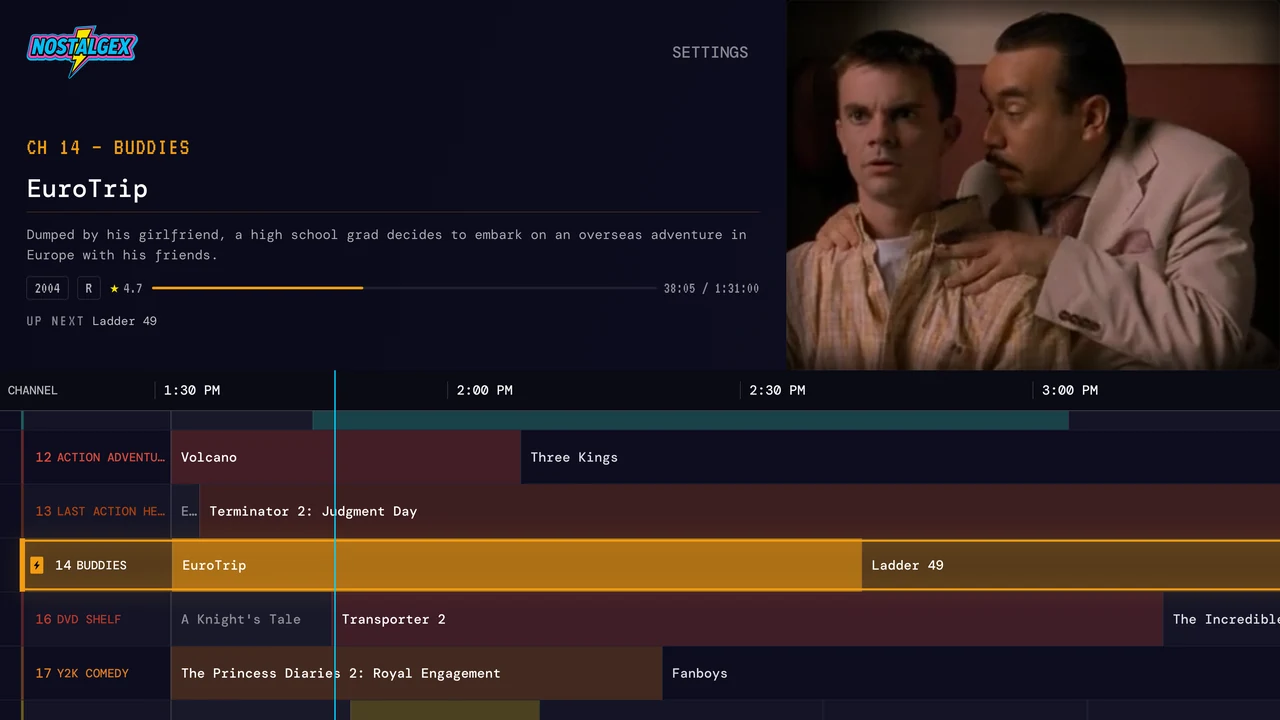
Nostalgex is a free, open source (MIT) app that turns your own library into a retro cable guide on Apple TV (tvOS 18 and up) and in a free web tuner. It's plug and play. For Plex, you open the app (or nostalgex.app in a browser), scan the code with your phone, approve it on your Plex account, and 130+ channels are already airing. No server plugin, no Docker needed, nothing to install on the server, no account. Jellyfin and Emby take one extra step, the server address, which I'll get to below.
Here's the plain version of how it lines up with this change:
- At home, on the same network as your server, Nostalgex plays from your Plex server and doesn't need a Plex Pass. That's where an Apple TV usually lives.
- Away from home, Plex's rule is Plex's rule. If Plex treats a connection as remote, expect it to apply to Nostalgex the same way it applies to any other third party app. I'd rather tell you that now than have your family find out on a Friday night.
- On Jellyfin or Emby, none of this applies, because it's a Plex policy. Nostalgex works with all three servers. On Apple TV you pick your server from the ones it finds on your network (or type the address), then approve a Quick Connect code on Jellyfin or sign in with your username and password on Emby. In the web tuner, those servers need an https address.
If you want to see what your library looks like as cable TV, here's how Nostalgex works with Plex, or get it on the App Store.
FAQ
Do I need a Plex Pass to watch my own Plex server at home?
No. Watching on the same local network as your server doesn't need a Plex Pass or a Remote Watch Pass. The rule only covers remote playback.
Does Infuse still work with Plex?
Yes, at home on the same network. For remote playback through Plex, Infuse now needs a Plex Pass on the server owner's account, or a Plex Pass or Remote Watch Pass on yours.
If I buy a Plex Pass, does my family need one too?
No. When the server owner has a Plex Pass, everyone they share with can stream remotely from that server without their own pass.
Why does Plex say I'm remote when I'm home?
Usually because it can't detect the local connection. Guest Wi-Fi, a VPN, separate subnets, blocked DNS rebinding or a Plex server in a container without host networking are the common causes.
Does Nostalgex need a Plex Pass?
Not at home on your own network. Away from home, Plex's remote rules apply to Nostalgex like any other third party Plex app.