
Sign in with a code
Nostalgex uses Plex's own link flow. The Apple TV shows a short code, you enter it at plex.tv/link, and that's the whole setup.
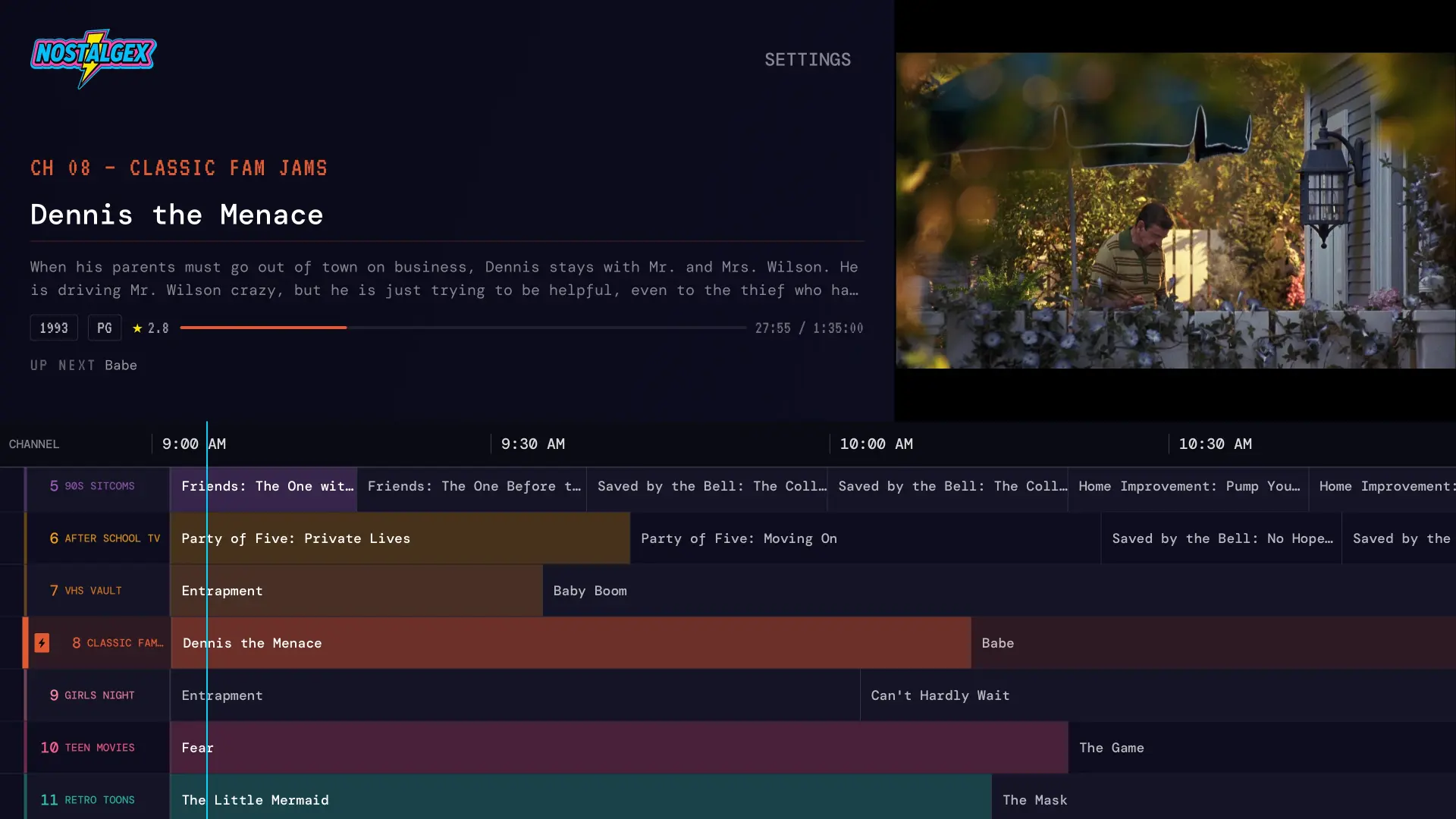
Nostalgex is a free, open source Apple TV app that turns your Plex library into 130+ live channels in 14 bundles, with a retro TV guide. Sign in with a code at plex.tv/link and something is already playing. No Plex Pass or other paid service needed.
Works with Plex on Apple TV (tvOS 18 or later) and in the free web tuner.
Open Nostalgex on the Apple TV and it shows a short code. Enter it at plex.tv/link in any browser and you're in. No typing a password with the remote.
Your library gets sorted into channels automatically. Saturday morning cartoons, 90s sitcoms, the VHS vault, the stuff you rewatch constantly. No playlists to make.
Pull up the guide, pick a channel, or just surf. Everything is already playing, so you drop into the middle of a movie like real TV.
Nostalgex is a front end for the server you already run. Here is exactly what it does and does not do with it.
Install Nostalgex free from the App Store on an Apple TV running tvOS 18 or later.
Open it and choose Plex. Your TV shows a short code.
Go to plex.tv/link on your phone or computer and enter the code. Nostalgex finds your server on its own.
Open the guide. Your channels are already on.
Nostalgex uses Plex's own link flow. The Apple TV shows a short code, you enter it at plex.tv/link, and that's the whole setup.
Plex already counts what you play. Nostalgex reads those counts and builds Rewatchables channels from the films and shows you keep coming back to.
Make a Plex collection with at least three movies, switch on the collection Channel Packages in Settings, and it becomes its own channel next to the 130+ built from genres, eras and franchises.
Reporting playback back to Plex is off unless you turn it on. Surfing past a dozen programmes in an evening would otherwise bury your real Continue Watching row under things nobody chose to start.
Direct play when the Apple TV can decode it, and it only falls back to transcoding when it has to. Movies split across two files play straight through as one programme.
A real tvOS app from the App Store, built for the Siri Remote and the big screen. Not a web view pretending.
The same idea runs in any browser, and it's the fastest way to try Nostalgex before installing anything. Plex is the easiest server to use with it: Plex gives your server secure plex.direct addresses, so the browser can reach it with no setup on your side. Open the free web tuner.
No. Nostalgex reads your library and plays from your own server, and none of that needs a Plex Pass or any other paid service. If you have one, nothing changes.
No. Reporting playback to Plex is off by default, so channel surfing doesn't bury the things your household actually chose to start. You can turn it on in Settings.
Yes, once Plex advertises that address. Add it under Plex Settings, Network, Custom server access URLs, then sign in to Nostalgex again.
Yes. Put at least three movies in a collection, switch on the collection Channel Packages in Settings, and rescan. The collection's name becomes the channel's name.
Yes, usually with no setup. Plex hands out secure plex.direct addresses, which is what a browser needs.
An Apple TV running tvOS 18 or later and a Plex server you can reach from it. The app is free and open source under the MIT license.
Need help? The Nostalgex setup guide covers every server. Want ideas for tonight? Read the Nostalgex blog.
Free, native, open source, and built for the couch.
;%20}%20%3c/style%3e%3clinearGradient%20id='linear-gradient'%20x1='126.19'%20y1='70.67'%20x2='86.24'%20y2='1.48'%20gradientUnits='userSpaceOnUse'%3e%3cstop%20offset='.19'%20stop-color='%23fdc70c'/%3e%3cstop%20offset='.54'%20stop-color='%23f3903f'/%3e%3cstop%20offset='.7'%20stop-color='%23ed683c'/%3e%3cstop%20offset='1'%20stop-color='%23e7588a'/%3e%3c/linearGradient%3e%3c/defs%3e%3cg%20id='Layer_1'%20data-name='Layer%201'%3e%3cg%3e%3cg%3e%3cpath%20d='M0,67.34V3.87h20.1l27.22,42.6h1.15l-.96-42.6h15.1v63.47h-18.18L15.29,22.33h-1.06l.87,45.01H0Z'/%3e%3cpath%20d='M178.31,68.69c-4.1,0-7.82-.38-11.16-1.15-3.33-.77-6.22-1.94-8.66-3.51-2.44-1.57-4.36-3.57-5.77-6.01-1.41-2.44-2.24-5.26-2.5-8.46l13.56-4.52c.19,2.69.96,4.94,2.31,6.73,1.35,1.8,3.16,3.13,5.43,3.99s4.82,1.3,7.65,1.3,4.95-.34,6.78-1.01c1.83-.67,3.21-1.54,4.14-2.6.93-1.06,1.39-2.2,1.39-3.41,0-1.41-.61-2.58-1.83-3.51-1.22-.93-2.89-1.73-5-2.4-2.12-.67-4.58-1.33-7.4-1.97-3.21-.77-6.35-1.6-9.42-2.5-3.08-.9-5.87-2.07-8.37-3.51s-4.47-3.3-5.91-5.58c-1.44-2.27-2.16-5.14-2.16-8.61,0-3.91.99-7.31,2.98-10.19,1.99-2.88,4.9-5.14,8.75-6.78,3.85-1.64,8.59-2.45,14.23-2.45s10.32.8,14.23,2.4c3.91,1.6,6.93,3.83,9.04,6.68,2.12,2.85,3.27,6.17,3.46,9.95l-13.85,3.94c0-1.86-.31-3.49-.91-4.9-.61-1.41-1.46-2.58-2.55-3.51-1.09-.93-2.44-1.63-4.04-2.12-1.6-.48-3.43-.72-5.48-.72-2.44,0-4.5.29-6.2.87-1.7.58-2.97,1.33-3.8,2.26-.83.93-1.25,2-1.25,3.22,0,1.54.66,2.81,1.97,3.8,1.31.99,3.11,1.83,5.39,2.5,2.27.67,4.79,1.33,7.55,1.97,2.76.58,5.61,1.3,8.56,2.16,2.95.86,5.71,2,8.27,3.41,2.56,1.41,4.63,3.32,6.2,5.72,1.57,2.4,2.36,5.43,2.36,9.09,0,3.91-1.04,7.33-3.13,10.24-2.08,2.92-5.21,5.18-9.38,6.78s-9.33,2.4-15.48,2.4Z'/%3e%3cpath%20d='M206.29,16.76V3.87h52.7v12.89h-52.7ZM224.76,67.34V3.87h15.58v63.47h-15.58Z'/%3e%3cpath%20d='M250.72,67.34l21.54-63.47h22.7l21.54,63.47h-16.93l-15.19-51.35h-1.54l-15.19,51.35h-16.93ZM263.51,55.42v-10.39h42.51v10.39h-42.51Z'/%3e%3cpath%20d='M319.67,67.34V3.87h15.48v63.47h-15.48ZM322.46,67.34v-12.98h38.56v12.98h-38.56Z'/%3e%3cpath%20d='M388.15,68.69c-5.19,0-9.87-1.19-14.04-3.56-4.17-2.37-7.45-5.95-9.86-10.72-2.41-4.78-3.61-10.79-3.61-18.03,0-5.32.69-10.07,2.07-14.23,1.38-4.17,3.45-7.71,6.2-10.63s6.14-5.15,10.15-6.68c4.01-1.54,8.64-2.31,13.9-2.31,3.98,0,7.58.45,10.82,1.35,3.24.9,6.04,2.18,8.41,3.85,2.37,1.67,4.22,3.65,5.53,5.96,1.31,2.31,2,4.9,2.07,7.79l-14.62,4.52c-.07-2.37-.67-4.36-1.83-5.96-1.15-1.6-2.69-2.84-4.62-3.7-1.92-.87-4.07-1.3-6.44-1.3-3.33,0-6.14.75-8.42,2.26-2.28,1.51-4.01,3.8-5.19,6.88s-1.78,6.93-1.78,11.54c0,3.46.34,6.49,1.01,9.09.67,2.6,1.68,4.76,3.03,6.49s3,3.03,4.95,3.9c1.95.87,4.28,1.3,6.97,1.3s5.02-.42,6.97-1.25c1.95-.83,3.51-2.12,4.66-3.85,1.15-1.73,1.76-3.94,1.83-6.64h-11.25v-10.96h26.64v33.56h-10.58l-.19-15.87h-1.92c-1.09,3.72-2.5,6.86-4.23,9.43s-3.94,4.5-6.64,5.82c-2.69,1.31-6.03,1.97-10,1.97Z'/%3e%3cpath%20d='M428.25,67.34V3.87h15.58v63.47h-15.58ZM439.5,16.28V3.87h38.85v12.4h-38.85ZM439.5,40.99v-11.25h34.24v11.25h-34.24ZM439.5,67.34v-12.5h39.14v12.5h-39.14Z'/%3e%3cpath%20d='M478.93,67.34l22.12-31.83-21.45-31.64h18.08l14.04,23.46h.58l14.23-23.46h18.18l-21.73,31.25,22.41,32.22h-18.08l-15-24.23h-.58l-14.71,24.23h-18.08Z'/%3e%3c/g%3e%3crect%20class='cls-1'%20x='71.66'%20y='5.25'%20width='69.1'%20height='61.65'%20rx='11'%20ry='11'/%3e%3cpath%20d='M122.4,0h-32.38c-13.39,0-24.24,10.85-24.24,24.24v23.66c0,13.39,10.85,24.24,24.24,24.24h32.38c13.39,0,24.24-10.85,24.24-24.24v-23.66c0-13.39-10.85-24.24-24.24-24.24ZM73.05,42.4v-10.9h66.33v10.9h-66.33ZM90.03,7.27h32.38c9.36,0,16.97,7.61,16.98,16.97h-66.33c0-9.36,7.62-16.97,16.98-16.97ZM122.4,64.88h-32.38c-8.77,0-16-6.68-16.89-15.22h66.15c-.88,8.54-8.12,15.22-16.89,15.22Z'/%3e%3c/g%3e%3c/g%3e%3c/svg%3e)