
Auto-built channels
Genres, eras, franchises, and habits become channels on their own. Add movies to your library and the lineup updates itself.
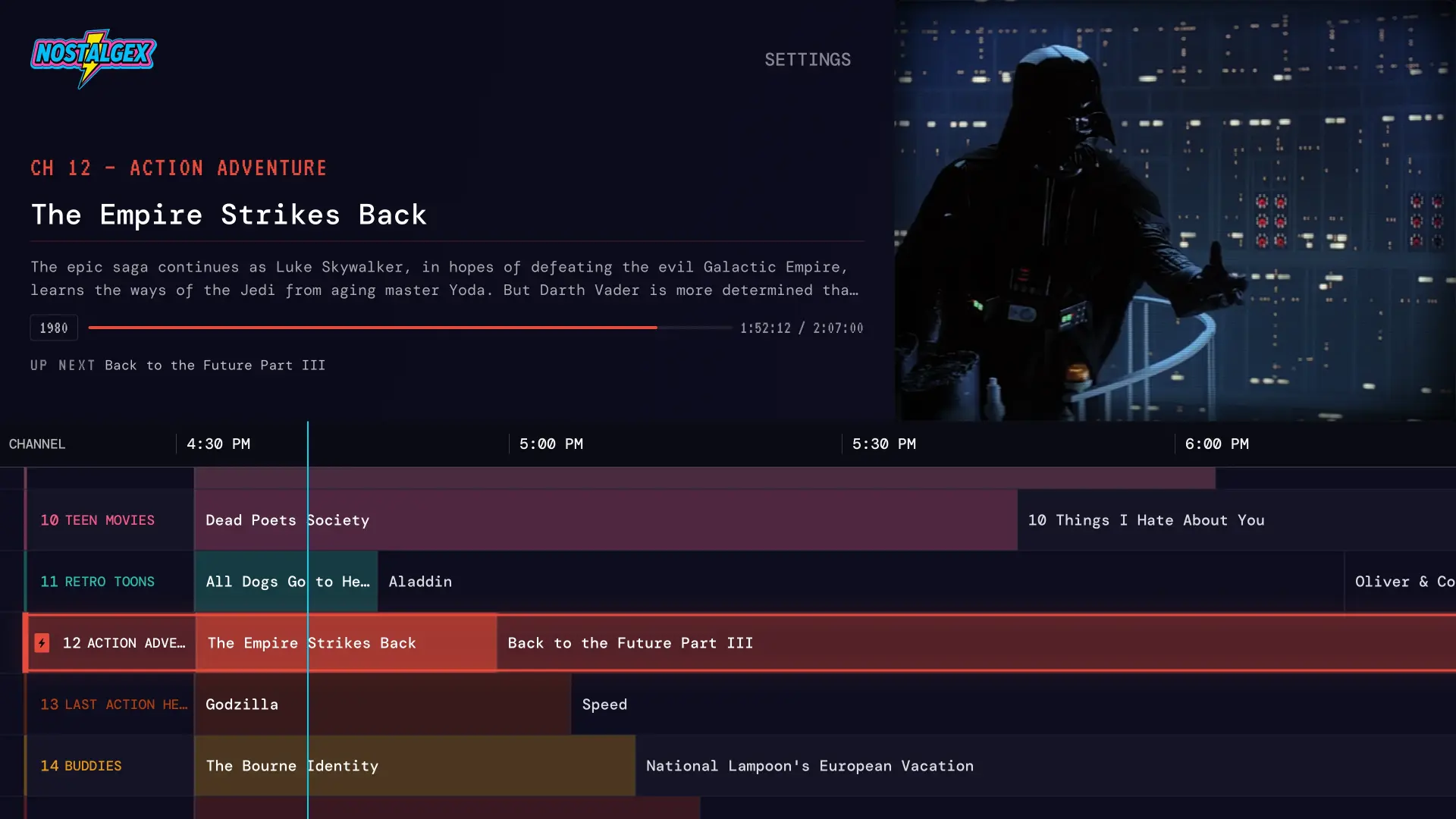
Nostalgex is a free, open source Apple TV app that turns your Plex, Jellyfin or Emby library into 130+ live channels in 14 bundles, with a retro TV guide. Flip around, land on something, and watch it like it's Friday night in 1996.
Plex, Jellyfin, and Emby. All three, right on Apple TV. Free and open source.
Plex, Jellyfin or Emby, on Apple TV or in a browser. That's the whole setup.
Saturday morning cartoons, 90s sitcoms, the VHS vault. Sorted from your library, no playlists.
Everything's already playing. Drop in halfway through, just like real TV.
Streaming apps give you ten thousand posters and no opinion. A channel guide gives you a lineup. Something is on channel 12 right now, and something else is on at 10.
Nostalgex builds that lineup from your own collection. Scroll the grid, see what's on, and commit. No trailers, no autoplay previews, no forty minutes of browsing.
No account to make, and the code is open, so you can see exactly what you're running. If it gave you a good Friday night, a coffee keeps the channels coming.
130+ channels, sorted into bundles like the back of a cable bill. Every one builds itself from your library.
What actually shows up depends on your library. No westerns, no Westerns channel. Fair.
Get a short email when new channels and features ship. That's it, that's the newsletter.
Nostalgex is free. If it made your Friday night, coffee helps.

The remote works the way remotes used to. Swipe through channels without leaving the picture and see what's up next before you commit.
Channels keep airing when you're not watching. Tune in at 9:40 and you're twenty minutes into something, just like the old days.
Genres, eras, franchises, and habits become channels on their own. Add movies to your library and the lineup updates itself.
Every channel runs a real schedule all day. Nothing waits for you to press play.
A real tvOS app from the App Store, built for the Siri Remote and the big screen. Not a web view pretending. The Apple TV home screen even shows what is on right now.
No Apple TV handy? Open the tuner in any browser and surf the same channels. It's the fastest way to try Nostalgex.
Every channel is built from media you already own. No catalog to subscribe to, nothing you didn't put there.
Point it at the server you already run and it builds the lineup from what is in there. The web tuner handles all three too, as long as your server answers over HTTPS. A plain LAN server needs the Apple TV app. More on Nostalgex for Plex, Nostalgex for Jellyfin, and Nostalgex for Emby.
Nostalgex connects straight from your device to your media server. Your credentials and your library never pass through our servers, because there is nothing on our end to pass through. Don't take our word for it: the whole app is open source on GitHub, so you can read every request it makes.
Yes. Nostalgex is a front end for a library you already have on Plex, Jellyfin, or Emby. If you run one of those, you're two minutes from channel surfing.
No, and that's on purpose. Nostalgex reads your library and builds the channels and schedules itself. The surprise of "oh, this is on" is the product.
Yes. Open it in a browser, connect your server, and watch. It needs a server reachable over HTTPS, so a plain LAN setup is an Apple TV app job. That is where the full living-room experience lives anyway.
No. Playback and sign-in happen directly between your device and your media server. We never see your credentials or your library.
Yes. The Apple TV app, the web tuner, this site and the channel rules are all on GitHub under the MIT license. It's the same code that ships to the App Store. Found a bug or a file that won't play? Open an issue there. Want your own channel lineup? Fork it.
Free, native, open source, and built for the couch.
;%20}%20%3c/style%3e%3clinearGradient%20id='linear-gradient'%20x1='126.19'%20y1='70.67'%20x2='86.24'%20y2='1.48'%20gradientUnits='userSpaceOnUse'%3e%3cstop%20offset='.19'%20stop-color='%23fdc70c'/%3e%3cstop%20offset='.54'%20stop-color='%23f3903f'/%3e%3cstop%20offset='.7'%20stop-color='%23ed683c'/%3e%3cstop%20offset='1'%20stop-color='%23e7588a'/%3e%3c/linearGradient%3e%3c/defs%3e%3cg%20id='Layer_1'%20data-name='Layer%201'%3e%3cg%3e%3cg%3e%3cpath%20d='M0,67.34V3.87h20.1l27.22,42.6h1.15l-.96-42.6h15.1v63.47h-18.18L15.29,22.33h-1.06l.87,45.01H0Z'/%3e%3cpath%20d='M178.31,68.69c-4.1,0-7.82-.38-11.16-1.15-3.33-.77-6.22-1.94-8.66-3.51-2.44-1.57-4.36-3.57-5.77-6.01-1.41-2.44-2.24-5.26-2.5-8.46l13.56-4.52c.19,2.69.96,4.94,2.31,6.73,1.35,1.8,3.16,3.13,5.43,3.99s4.82,1.3,7.65,1.3,4.95-.34,6.78-1.01c1.83-.67,3.21-1.54,4.14-2.6.93-1.06,1.39-2.2,1.39-3.41,0-1.41-.61-2.58-1.83-3.51-1.22-.93-2.89-1.73-5-2.4-2.12-.67-4.58-1.33-7.4-1.97-3.21-.77-6.35-1.6-9.42-2.5-3.08-.9-5.87-2.07-8.37-3.51s-4.47-3.3-5.91-5.58c-1.44-2.27-2.16-5.14-2.16-8.61,0-3.91.99-7.31,2.98-10.19,1.99-2.88,4.9-5.14,8.75-6.78,3.85-1.64,8.59-2.45,14.23-2.45s10.32.8,14.23,2.4c3.91,1.6,6.93,3.83,9.04,6.68,2.12,2.85,3.27,6.17,3.46,9.95l-13.85,3.94c0-1.86-.31-3.49-.91-4.9-.61-1.41-1.46-2.58-2.55-3.51-1.09-.93-2.44-1.63-4.04-2.12-1.6-.48-3.43-.72-5.48-.72-2.44,0-4.5.29-6.2.87-1.7.58-2.97,1.33-3.8,2.26-.83.93-1.25,2-1.25,3.22,0,1.54.66,2.81,1.97,3.8,1.31.99,3.11,1.83,5.39,2.5,2.27.67,4.79,1.33,7.55,1.97,2.76.58,5.61,1.3,8.56,2.16,2.95.86,5.71,2,8.27,3.41,2.56,1.41,4.63,3.32,6.2,5.72,1.57,2.4,2.36,5.43,2.36,9.09,0,3.91-1.04,7.33-3.13,10.24-2.08,2.92-5.21,5.18-9.38,6.78s-9.33,2.4-15.48,2.4Z'/%3e%3cpath%20d='M206.29,16.76V3.87h52.7v12.89h-52.7ZM224.76,67.34V3.87h15.58v63.47h-15.58Z'/%3e%3cpath%20d='M250.72,67.34l21.54-63.47h22.7l21.54,63.47h-16.93l-15.19-51.35h-1.54l-15.19,51.35h-16.93ZM263.51,55.42v-10.39h42.51v10.39h-42.51Z'/%3e%3cpath%20d='M319.67,67.34V3.87h15.48v63.47h-15.48ZM322.46,67.34v-12.98h38.56v12.98h-38.56Z'/%3e%3cpath%20d='M388.15,68.69c-5.19,0-9.87-1.19-14.04-3.56-4.17-2.37-7.45-5.95-9.86-10.72-2.41-4.78-3.61-10.79-3.61-18.03,0-5.32.69-10.07,2.07-14.23,1.38-4.17,3.45-7.71,6.2-10.63s6.14-5.15,10.15-6.68c4.01-1.54,8.64-2.31,13.9-2.31,3.98,0,7.58.45,10.82,1.35,3.24.9,6.04,2.18,8.41,3.85,2.37,1.67,4.22,3.65,5.53,5.96,1.31,2.31,2,4.9,2.07,7.79l-14.62,4.52c-.07-2.37-.67-4.36-1.83-5.96-1.15-1.6-2.69-2.84-4.62-3.7-1.92-.87-4.07-1.3-6.44-1.3-3.33,0-6.14.75-8.42,2.26-2.28,1.51-4.01,3.8-5.19,6.88s-1.78,6.93-1.78,11.54c0,3.46.34,6.49,1.01,9.09.67,2.6,1.68,4.76,3.03,6.49s3,3.03,4.95,3.9c1.95.87,4.28,1.3,6.97,1.3s5.02-.42,6.97-1.25c1.95-.83,3.51-2.12,4.66-3.85,1.15-1.73,1.76-3.94,1.83-6.64h-11.25v-10.96h26.64v33.56h-10.58l-.19-15.87h-1.92c-1.09,3.72-2.5,6.86-4.23,9.43s-3.94,4.5-6.64,5.82c-2.69,1.31-6.03,1.97-10,1.97Z'/%3e%3cpath%20d='M428.25,67.34V3.87h15.58v63.47h-15.58ZM439.5,16.28V3.87h38.85v12.4h-38.85ZM439.5,40.99v-11.25h34.24v11.25h-34.24ZM439.5,67.34v-12.5h39.14v12.5h-39.14Z'/%3e%3cpath%20d='M478.93,67.34l22.12-31.83-21.45-31.64h18.08l14.04,23.46h.58l14.23-23.46h18.18l-21.73,31.25,22.41,32.22h-18.08l-15-24.23h-.58l-14.71,24.23h-18.08Z'/%3e%3c/g%3e%3crect%20class='cls-1'%20x='71.66'%20y='5.25'%20width='69.1'%20height='61.65'%20rx='11'%20ry='11'/%3e%3cpath%20d='M122.4,0h-32.38c-13.39,0-24.24,10.85-24.24,24.24v23.66c0,13.39,10.85,24.24,24.24,24.24h32.38c13.39,0,24.24-10.85,24.24-24.24v-23.66c0-13.39-10.85-24.24-24.24-24.24ZM73.05,42.4v-10.9h66.33v10.9h-66.33ZM90.03,7.27h32.38c9.36,0,16.97,7.61,16.98,16.97h-66.33c0-9.36,7.62-16.97,16.98-16.97ZM122.4,64.88h-32.38c-8.77,0-16-6.68-16.89-15.22h66.15c-.88,8.54-8.12,15.22-16.89,15.22Z'/%3e%3c/g%3e%3c/g%3e%3c/svg%3e)