
Quick Connect
Approve the Apple TV from a browser you are already signed into on your Jellyfin server. No typing a long password with the remote.
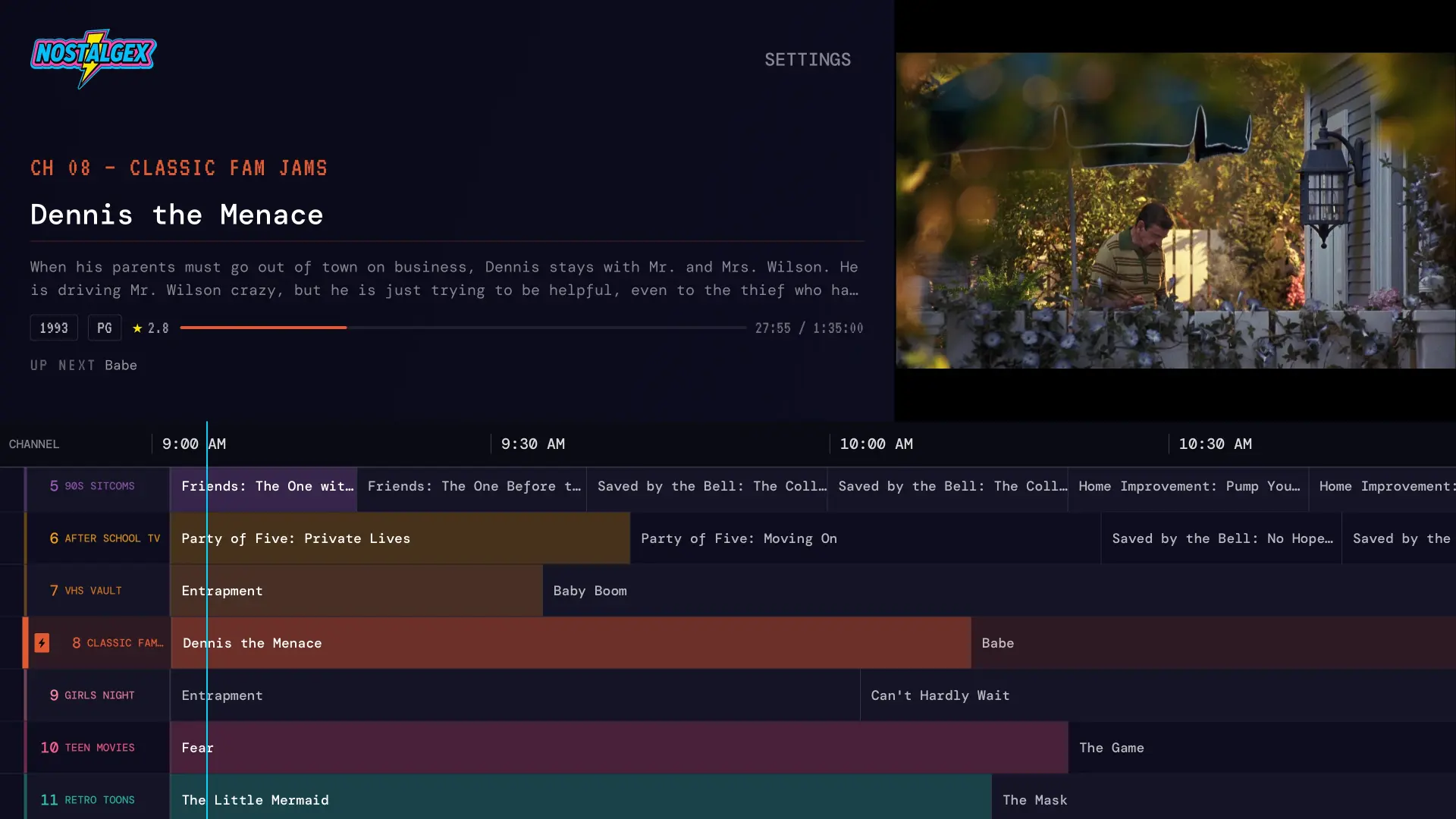
Nostalgex is a free, open source Apple TV app that turns your Jellyfin library into 130+ live channels in 14 bundles, with a retro TV guide. It's plug and play: Nostalgex finds your server on your network and puts a Quick Connect code on screen to approve from your phone. There's nothing to install on your server and no paid service needed.
Works with Jellyfin on Apple TV (tvOS 18 or later) and in the free web tuner. Open source under MIT, like the server you chose.
Open Nostalgex on the Apple TV and choose Jellyfin. It finds your server on your network and, with Quick Connect on, puts a code on screen to approve from your phone. The app talks straight to your server.
Your library gets sorted into channels automatically. Saturday morning cartoons, 90s sitcoms, the VHS vault, the stuff you rewatch constantly. No playlists to make.
Pull up the guide, pick a channel, or just surf. Everything is already playing, so you drop into the middle of a movie like real TV.
Typing a server password into somebody else's app is a fair thing to be suspicious about. So here is exactly what Nostalgex does with it.
Install Nostalgex free from the App Store on an Apple TV running tvOS 18 or later.
Open it and choose Jellyfin. Nostalgex looks for your server on your network and goes straight to it. If it can't find it, press TYPE AN ADDRESS and enter it with the scheme and port, the way another client uses it (for example http://192.168.1.20:8096).
With Quick Connect on, the code is already on screen. Approve it in Jellyfin on your phone or computer, or press SIGN IN WITH A PASSWORD.
Open the guide. Your channels are already on.
Approve the Apple TV from a browser you are already signed into on your Jellyfin server. No typing a long password with the remote.
A Collection or BoxSet on your Jellyfin server with at least three movies becomes its own channel once you switch on the collection Channel Packages and rescan.
Pick a subtitle and audio language once and the app remembers it. Files with several audio tracks behave the way you would expect.
Switch whole bundles on and off in Settings, so the lineup fits your household.
Direct play when the Apple TV can decode it, and it only falls back to transcoding when it has to. Movies split across two files play straight through as one programme.
A real tvOS app from the App Store, built for the Siri Remote and the big screen. Not a web view pretending.
The same channels, running in any browser. It is the fastest way to see what this is before installing anything.
One caveat worth knowing up front. Browsers block a secure page from talking to a plain http server, so the web tuner needs your Jellyfin server on an https address. If yours is http on the local network, use the Apple TV app instead. It has no such restriction. Open the free web tuner.
Yes, natively. The Apple TV app talks to your Jellyfin server directly. There's no bridge, no middleman service and no Plex account involved.
No. Nostalgex finds your server on your network and puts a Quick Connect code on screen, so you approve the Apple TV from your phone or a browser that's already signed in. Typing a server address and password still works.
Almost always because the server is on plain http, which browsers block from a secure page. Give it an https address, fix the CORS header if it's behind a proxy, or use the Apple TV app, which connects to http servers on your network.
Yes, in the Apple TV app. Hostnames, VPN addresses and Tailscale addresses connect, including over plain http.
No. It reads your library to build the channels. It never adds, renames, moves or deletes anything.
An Apple TV running tvOS 18 or later and a Jellyfin server you can reach from it. The app is free, open source under MIT, and needs no paid service.
Stuck connecting? The Nostalgex setup guide and the web tuner CORS fixes cover the usual suspects.
Free, native, open source, and built for the couch.
;%20}%20%3c/style%3e%3clinearGradient%20id='linear-gradient'%20x1='126.19'%20y1='70.67'%20x2='86.24'%20y2='1.48'%20gradientUnits='userSpaceOnUse'%3e%3cstop%20offset='.19'%20stop-color='%23fdc70c'/%3e%3cstop%20offset='.54'%20stop-color='%23f3903f'/%3e%3cstop%20offset='.7'%20stop-color='%23ed683c'/%3e%3cstop%20offset='1'%20stop-color='%23e7588a'/%3e%3c/linearGradient%3e%3c/defs%3e%3cg%20id='Layer_1'%20data-name='Layer%201'%3e%3cg%3e%3cg%3e%3cpath%20d='M0,67.34V3.87h20.1l27.22,42.6h1.15l-.96-42.6h15.1v63.47h-18.18L15.29,22.33h-1.06l.87,45.01H0Z'/%3e%3cpath%20d='M178.31,68.69c-4.1,0-7.82-.38-11.16-1.15-3.33-.77-6.22-1.94-8.66-3.51-2.44-1.57-4.36-3.57-5.77-6.01-1.41-2.44-2.24-5.26-2.5-8.46l13.56-4.52c.19,2.69.96,4.94,2.31,6.73,1.35,1.8,3.16,3.13,5.43,3.99s4.82,1.3,7.65,1.3,4.95-.34,6.78-1.01c1.83-.67,3.21-1.54,4.14-2.6.93-1.06,1.39-2.2,1.39-3.41,0-1.41-.61-2.58-1.83-3.51-1.22-.93-2.89-1.73-5-2.4-2.12-.67-4.58-1.33-7.4-1.97-3.21-.77-6.35-1.6-9.42-2.5-3.08-.9-5.87-2.07-8.37-3.51s-4.47-3.3-5.91-5.58c-1.44-2.27-2.16-5.14-2.16-8.61,0-3.91.99-7.31,2.98-10.19,1.99-2.88,4.9-5.14,8.75-6.78,3.85-1.64,8.59-2.45,14.23-2.45s10.32.8,14.23,2.4c3.91,1.6,6.93,3.83,9.04,6.68,2.12,2.85,3.27,6.17,3.46,9.95l-13.85,3.94c0-1.86-.31-3.49-.91-4.9-.61-1.41-1.46-2.58-2.55-3.51-1.09-.93-2.44-1.63-4.04-2.12-1.6-.48-3.43-.72-5.48-.72-2.44,0-4.5.29-6.2.87-1.7.58-2.97,1.33-3.8,2.26-.83.93-1.25,2-1.25,3.22,0,1.54.66,2.81,1.97,3.8,1.31.99,3.11,1.83,5.39,2.5,2.27.67,4.79,1.33,7.55,1.97,2.76.58,5.61,1.3,8.56,2.16,2.95.86,5.71,2,8.27,3.41,2.56,1.41,4.63,3.32,6.2,5.72,1.57,2.4,2.36,5.43,2.36,9.09,0,3.91-1.04,7.33-3.13,10.24-2.08,2.92-5.21,5.18-9.38,6.78s-9.33,2.4-15.48,2.4Z'/%3e%3cpath%20d='M206.29,16.76V3.87h52.7v12.89h-52.7ZM224.76,67.34V3.87h15.58v63.47h-15.58Z'/%3e%3cpath%20d='M250.72,67.34l21.54-63.47h22.7l21.54,63.47h-16.93l-15.19-51.35h-1.54l-15.19,51.35h-16.93ZM263.51,55.42v-10.39h42.51v10.39h-42.51Z'/%3e%3cpath%20d='M319.67,67.34V3.87h15.48v63.47h-15.48ZM322.46,67.34v-12.98h38.56v12.98h-38.56Z'/%3e%3cpath%20d='M388.15,68.69c-5.19,0-9.87-1.19-14.04-3.56-4.17-2.37-7.45-5.95-9.86-10.72-2.41-4.78-3.61-10.79-3.61-18.03,0-5.32.69-10.07,2.07-14.23,1.38-4.17,3.45-7.71,6.2-10.63s6.14-5.15,10.15-6.68c4.01-1.54,8.64-2.31,13.9-2.31,3.98,0,7.58.45,10.82,1.35,3.24.9,6.04,2.18,8.41,3.85,2.37,1.67,4.22,3.65,5.53,5.96,1.31,2.31,2,4.9,2.07,7.79l-14.62,4.52c-.07-2.37-.67-4.36-1.83-5.96-1.15-1.6-2.69-2.84-4.62-3.7-1.92-.87-4.07-1.3-6.44-1.3-3.33,0-6.14.75-8.42,2.26-2.28,1.51-4.01,3.8-5.19,6.88s-1.78,6.93-1.78,11.54c0,3.46.34,6.49,1.01,9.09.67,2.6,1.68,4.76,3.03,6.49s3,3.03,4.95,3.9c1.95.87,4.28,1.3,6.97,1.3s5.02-.42,6.97-1.25c1.95-.83,3.51-2.12,4.66-3.85,1.15-1.73,1.76-3.94,1.83-6.64h-11.25v-10.96h26.64v33.56h-10.58l-.19-15.87h-1.92c-1.09,3.72-2.5,6.86-4.23,9.43s-3.94,4.5-6.64,5.82c-2.69,1.31-6.03,1.97-10,1.97Z'/%3e%3cpath%20d='M428.25,67.34V3.87h15.58v63.47h-15.58ZM439.5,16.28V3.87h38.85v12.4h-38.85ZM439.5,40.99v-11.25h34.24v11.25h-34.24ZM439.5,67.34v-12.5h39.14v12.5h-39.14Z'/%3e%3cpath%20d='M478.93,67.34l22.12-31.83-21.45-31.64h18.08l14.04,23.46h.58l14.23-23.46h18.18l-21.73,31.25,22.41,32.22h-18.08l-15-24.23h-.58l-14.71,24.23h-18.08Z'/%3e%3c/g%3e%3crect%20class='cls-1'%20x='71.66'%20y='5.25'%20width='69.1'%20height='61.65'%20rx='11'%20ry='11'/%3e%3cpath%20d='M122.4,0h-32.38c-13.39,0-24.24,10.85-24.24,24.24v23.66c0,13.39,10.85,24.24,24.24,24.24h32.38c13.39,0,24.24-10.85,24.24-24.24v-23.66c0-13.39-10.85-24.24-24.24-24.24ZM73.05,42.4v-10.9h66.33v10.9h-66.33ZM90.03,7.27h32.38c9.36,0,16.97,7.61,16.98,16.97h-66.33c0-9.36,7.62-16.97,16.98-16.97ZM122.4,64.88h-32.38c-8.77,0-16-6.68-16.89-15.22h66.15c-.88,8.54-8.12,15.22-16.89,15.22Z'/%3e%3c/g%3e%3c/g%3e%3c/svg%3e)