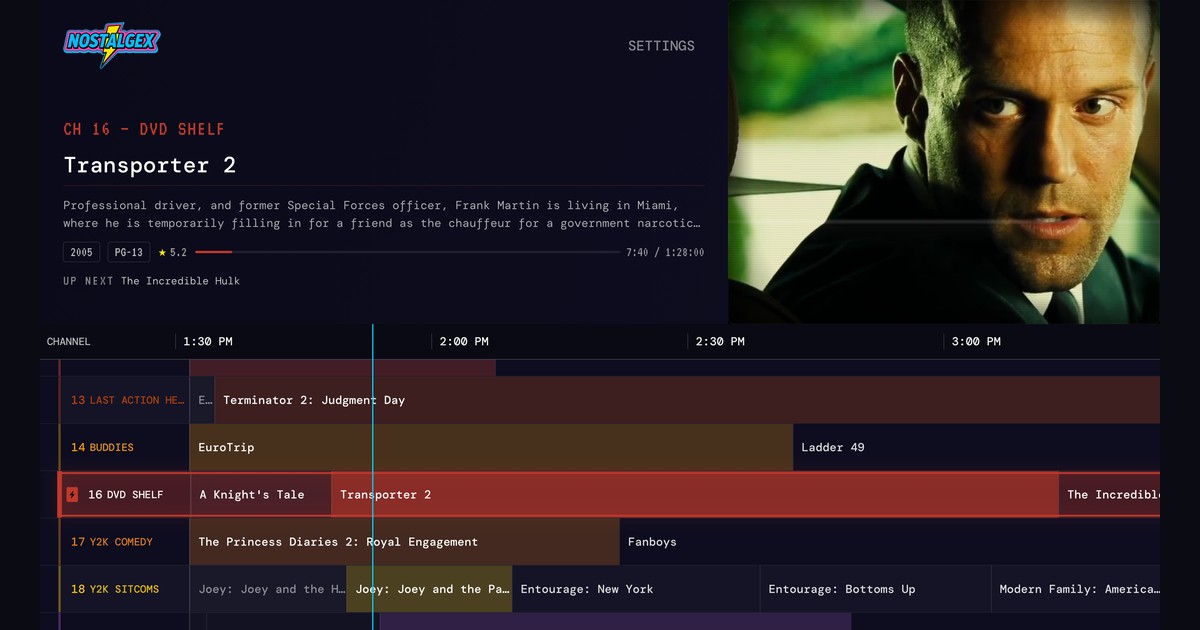
You built the Plex server. You ripped the DVDs, fixed the metadata, maybe bought a second hard drive you didn't tell anyone about. And now, most nights, you open it, scroll for twenty minutes, and put on The Office again. If you want to make Plex like cable, with an actual live TV guide full of channels that are already playing, this is the post for you.
The short version: a free, open source app called Nostalgex turns the library you already have on Plex (or Jellyfin, or Emby) into live channels with a retro channel guide. It doesn't add any movies or shows. It just programs the ones you own, so you can flip around like it's a Friday in 1996.
Why Endless Scrolling Kills Movie Night
A poster grid asks you a question every night: out of everything you own, what do you want right now? That's a terrible question. Nobody knows. So you scroll, you watch a trailer, you scroll some more, and then somebody says "let's just go to bed."
Cable never asked. Something was on channel 12. Something else was on at 10. You'd land in the middle of Jurassic Park, and twenty minutes later you were fully invested in a movie you'd never have picked from a menu. The lack of choice was the feature.
What a Live Channel Guide Fixes
A channel guide gives your library an opinion. Instead of ten thousand posters, you get a lineup.
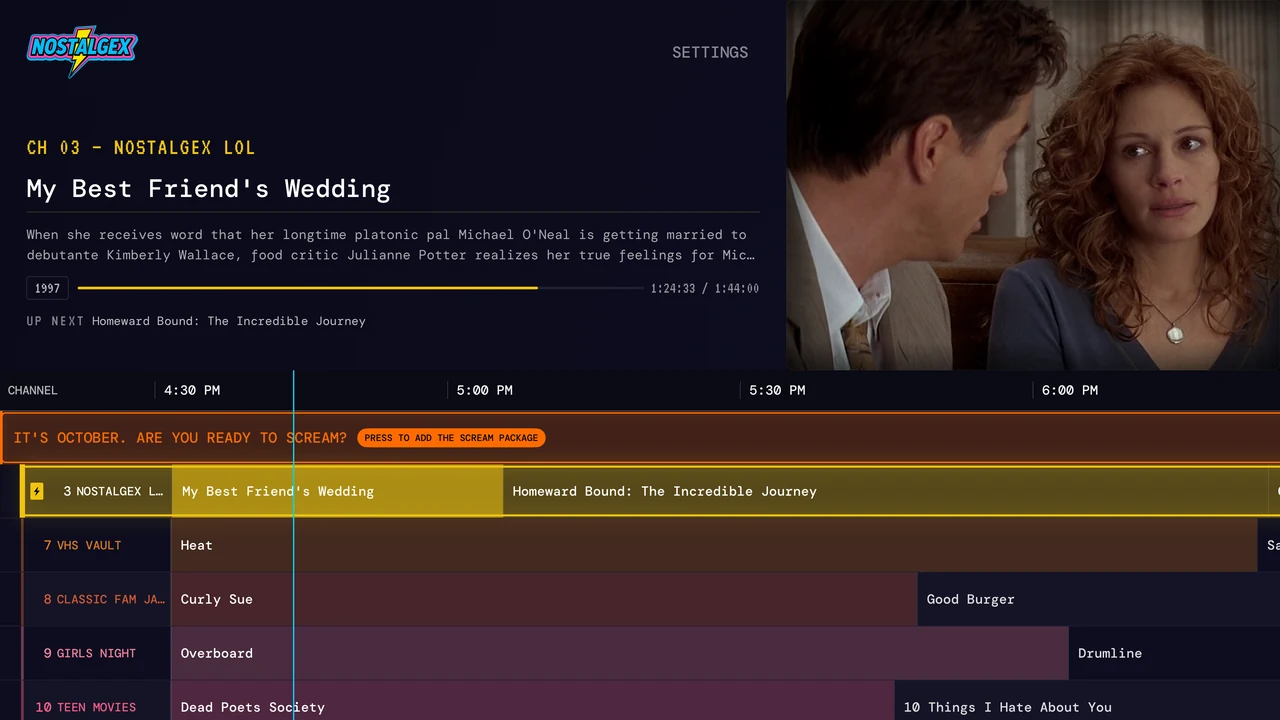
Plex has its own Live TV section, but it's built around Plex's streaming channels and antenna tuners, not the movies sitting on your server. Nostalgex fills that gap by building Plex channels out of your own library:
- Every channel runs a schedule all day, even when nobody is watching.
- When you tune in, you drop into whatever is airing right now, in the middle of a movie, like real TV.
- The lineup refreshes through the day from what's in your library.
There are 130+ channels in 14 bundles, sorted like the back of a cable bill. NOSTALGEX has things like SAT MORNING CARTOONS, 90S SITCOMS, VHS VAULT, TEEN MOVIES, and BUDDIES (home of our Friday night buddy cop channel). KIDZ ZONE has channels like DIZNEY TOONS. There are decade channels, franchise channels, and seasonal ones too, like SCREAM for October (here's our Halloween slasher lineup) and TIS THE SEASON for December. What actually shows up depends on your library. No westerns, no Westerns channel.
What Nostalgex Is (and Isn't)
It's a front end for your own server. It does not host, stream, or supply any media. Every frame comes off your machine.
It's also free, with no Nostalgex account to make. The Apple TV app, the web tuner, and the channel rules are all open source on GitHub under the MIT license. Sign in and playback happen directly between your device and your server, and the app reads your library without adding, renaming, moving, or deleting anything.
And it's plug and play. Connect your server and Nostalgex builds every channel and every schedule from your library on its own. No playlists, no programming, nothing to set up. The movies you already own just start airing.
How to Set It Up with Plex
Connect your server and the guide fills itself. That's the whole setup.
Go to nostalgex.app and open the free web tuner. Choose Plex and it gives you a code to enter on Plex's site (or one to scan). Approve it, Nostalgex finds your server on its own, and the guide comes up full of channels that are already airing. You never type your Plex password into Nostalgex.
Then flip. While something plays you can move up and down through channels without leaving the picture, and see what's on next before you commit. Want the full 1996 effect? Retro mode adds CRT scanlines, a vignette, VHS glitch, and a 4:3 frame.
If a channel ever looks thin, it's almost always metadata. The channels read the genre and year on your server, so a movie tagged only "Drama" or carrying a rerelease date can miss its spot. Fix it on the server and Nostalgex catches up by itself.
Jellyfin Live TV Channels and Emby
Running Jellyfin? It works natively. Sign in with Quick Connect, or type your server address and log in. Use the full URL with the scheme on the front, like https://jellyfin.yourdomain.com. If you've been searching for Jellyfin live TV channels built from your own library rather than an IPTV list, this is that.
Emby works too, with your Emby username and password. In the Apple TV app it's its own option. On the web tuner, choose Connect with Emby and point it at your Emby server.
The One Catch: The Web Tuner Needs HTTPS
Here's the honest part. The web tuner runs on a secure HTTPS page, and browsers block secure pages from talking to a plain http server or a raw IP address. That's a browser rule, not something Nostalgex can switch off.
For Plex, this usually isn't an issue, because Plex hands out its own secure addresses for your server. For Jellyfin and Emby, the server needs an https address.
Tip: if your Jellyfin or Emby box only lives on your home network, a free tunnel like Tailscale Serve or a Cloudflare Tunnel can give it an https address without much fuss. If it's behind a reverse proxy like nginx or Caddy and the tuner still can't reach it, your proxy probably needs to allow requests from https://nostalgex.app. The Nostalgex support page has copy and paste examples. Or skip all of it and use the Apple TV app, which connects to plain http servers on your network just fine.
Move It to the Living Room: The Apple TV App
The web tuner is the test drive. The Apple TV app is where this really clicks. It's a native tvOS app from the App Store, free, and it needs tvOS 18 or later. Open it, choose Plex, and sign in with your Plex account. You get a code to approve on Plex's site, so you never type your password with the remote.
A few things only make sense on the couch. The Siri Remote flips channels the way remotes used to. Put Nostalgex in the top row of your home screen and it shows what's on right now, and picking a channel tunes straight to it. A Now Playing panel handles captions, audio language, retro mode, and a sleep timer without leaving the show.
Turn Your Library Back into TV
Start with the free web tuner at nostalgex.app. Connect Plex, Jellyfin, or Emby (over HTTPS), and you'll be flipping channels in a couple of minutes. When you're hooked, get Nostalgex free on Apple TV.
Your movies were always good. They just needed a schedule.